The script lives in a PDF the agent cannot read mid-call
New agents freeze, experienced agents improvise. The answer to the objection exists — three tabs away, after the customer has hung up.
Quality management tells you what an agent should have said — a day later, in a coaching session. Ender Assist says it during the call: it listens to the conversation running in the agent's browser and puts the matching script, answer or reminder in a side panel the moment it is needed. A separate product from the same team, and we set it up with you: your scripts, your telephony, your agents.
Flows: what to say when the customer asks about a price, a cancellation, a delivery — step by step, with conditions. Interruptions: reminders that fire on a key event at any point in the call. Flows can be drafted from the script document you already use.
It runs inside the telephony page the agent already uses, listens to the call that is already there and opens a side panel. Nothing changes in the telephony platform.
The customer says the trigger; the side panel shows the step. Details the customer gives — a name, a plan, an amount — are captured as slots and change what the next card says.
New agents freeze, experienced agents improvise. The answer to the objection exists — three tabs away, after the customer has hung up.
QA finds the missed line tomorrow. The customer who heard the wrong answer today is already gone.
New product, new compliance line, new promotion — and the update reaches the floor by email, if at all.
Built and in production. We set it up with you: your scripts become flows, your telephony is connected, your agents are running on it.
A flow starts when the customer says one of its trigger phrases — "I want to cancel", "how much is" — and walks the agent through the steps: what to say, what to ask, what to check, with conditions deciding which step comes next.
Independent of any flow: a compliance line that must be said before a payment, an escalation rule when the customer mentions a competitor, a discount cap. They fire the moment the event happens and can count how often it did.
Names, plans, amounts, dates — extracted from the conversation as it runs and used in the conditions and the text of the next card, so the agent reads "confirm the €120 plan", not "confirm the amount".
Start from the script document your team already uses — flows can be drafted from it and then edited in the management UI, which also holds your agents, account users and usage per call.
Google Chrome desktop, browser-based telephony: the extension reuses the audio the page already has, opens a side panel, and shows connection state and recommendations. Your telephony platform is not changed and not written to.
Ender Assist helps during the call; the Ender Turing analytics platform scores and analyzes the same browser calls after they end when its call recorder runs alongside — one team to call, one scorecard language, no second vendor to integrate.
Each procedure has its own preparation rules. When an agent gets them wrong, the patient arrives unprepared, the slot is lost and the clinic pays for it. Ender Assist hears which procedure the patient is booking and puts that procedure's preparation on the agent's screen before the call ends.
Their playbook covers 20 objections, from “We're all set” to “Send me an email”, with two to eight answers each and one rule: two no's, then go. No agent holds that in their head at cold-call pace. Ender Assist hears the objection and puts its answers on the agent's screen while the prospect is still on the line.
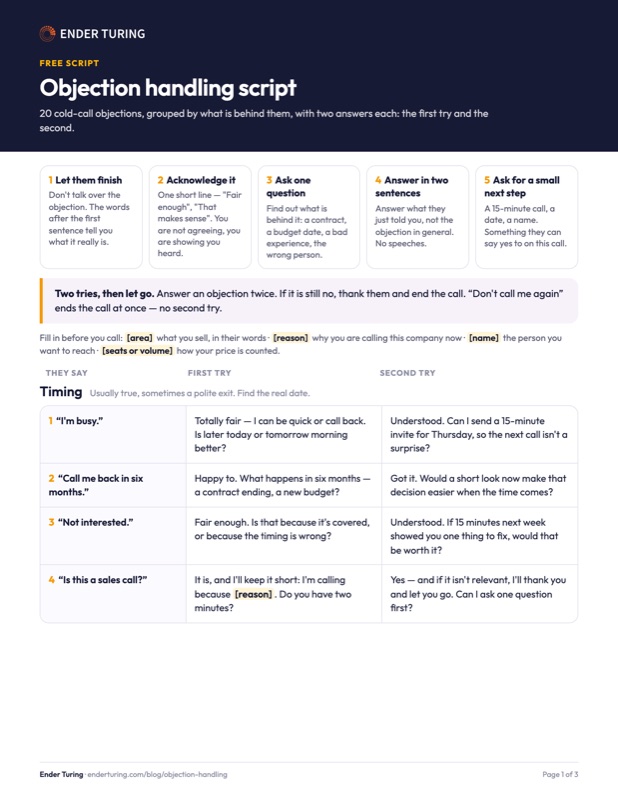
20 cold-call objections with two answers each — yours free when you subscribe to Buyer Insights.
The next buyer insight will come to your inbox.
Real-time agent assist, for calls where one wrong word costs more than the call.
AutoQA scores every recorded call on your scorecard, with its accuracy against your reviewers shown — the check that the playbook is being followed.
Transcripts, topics, funnels and boards on 100% of calls — the analytics that tells you which flows to write next.
Browser-based platforms whose page can be instrumented; the origins are declared before rollout and tested with your provider.
Software that helps a contact-center agent during a live conversation: it follows what is being said and shows the agent the next best step — a script, an answer, a compliance reminder — while the customer is still on the line. It differs from quality management, which reviews the conversation afterwards, and from a chatbot, which talks to the customer instead of the agent.
Yes. Real-time agent assist, agent copilot, real-time agent guidance and in-call assistance name the same thing: software that follows a live conversation and shows the agent what to say or do next. Ender Assist is that product for agents on browser-based telephony, with the script, the answers and the compliance reminders written by your own team.
Five checks. It runs on the telephony you already have instead of replacing it. The team that owns the scripts can change the flows without an integrator. It reacts to what the customer says, and its reminders fire at any point in the call, not only inside a script. It publishes a price per call. And the same vendor scores the calls afterwards, so you can see whether the playbook was followed. Ender Assist does all five on browser-based telephony in Google Chrome desktop, at $0.49 per assisted call in early access, and the Ender Turing analytics platform scores the same calls when its call recorder runs alongside; native desktop softphones cannot be instrumented today.
A Chrome extension runs inside the telephony page the agent already uses. It observes the call audio that the page already carries, streams it to the Ender Assist service, which transcribes it as it happens and tracks the state of the conversation against your flows and interruptions; the matching recommendation appears in a Chrome side panel. Everything the agent sees is configured by you in the management UI.
Those are features of their own platforms. Ender Assist runs as an extension on top of the browser-based telephony you already have, so it does not depend on the platform vendor's roadmap, and it is configured by the team that owns the scripts, not by a system integrator. It is also part of one platform with the post-call analytics and quality scoring.
Browser-based telephony in Google Chrome desktop that uses the standard WebRTC audio in the same browser profile — the page origins are declared and tested before rollout, together with your provider. Native or remotely published softphones cannot be instrumented. Tell us your platform and we confirm it in the first call.
The recommendations are your text, in your language. The live transcription runs in the languages configured for your account; we confirm yours before the rollout.
$0.49 per assisted call, sold separately from the analytics plans. Ender Assist is in production with the first customers, and the setup is white-glove: we turn your scripts into flows, declare your telephony origins, install the extension with your IT and run a test call with an agent. Write us with your telephony platform and the size of the floor.
Install the extension, log in once, and keep the side panel open during calls. Nothing else changes: the same telephony page, the same headset, the same way of making and taking calls.
The extension reads only the declared telephony pages, sends audio only during a call and only to the Ender Assist service over encrypted connections; there is no public installation channel — the package is supplied by Ender Turing and updated on our instruction. Ender Turing is SOC 2 Type II audited and handles data in a GDPR-compliant way.
Security, hosting regions, sub-processors and response times are documented on the Data Security page; SOC 2 Type II audited, the latest report available under NDA.
Write us with your telephony platform and the size of the team; we confirm compatibility, load your first flows and run a live test call with one agent.